3D Command Center: see building events where they happen
Locate access points, open linked cameras and verify alerts in the spatial context of your site.
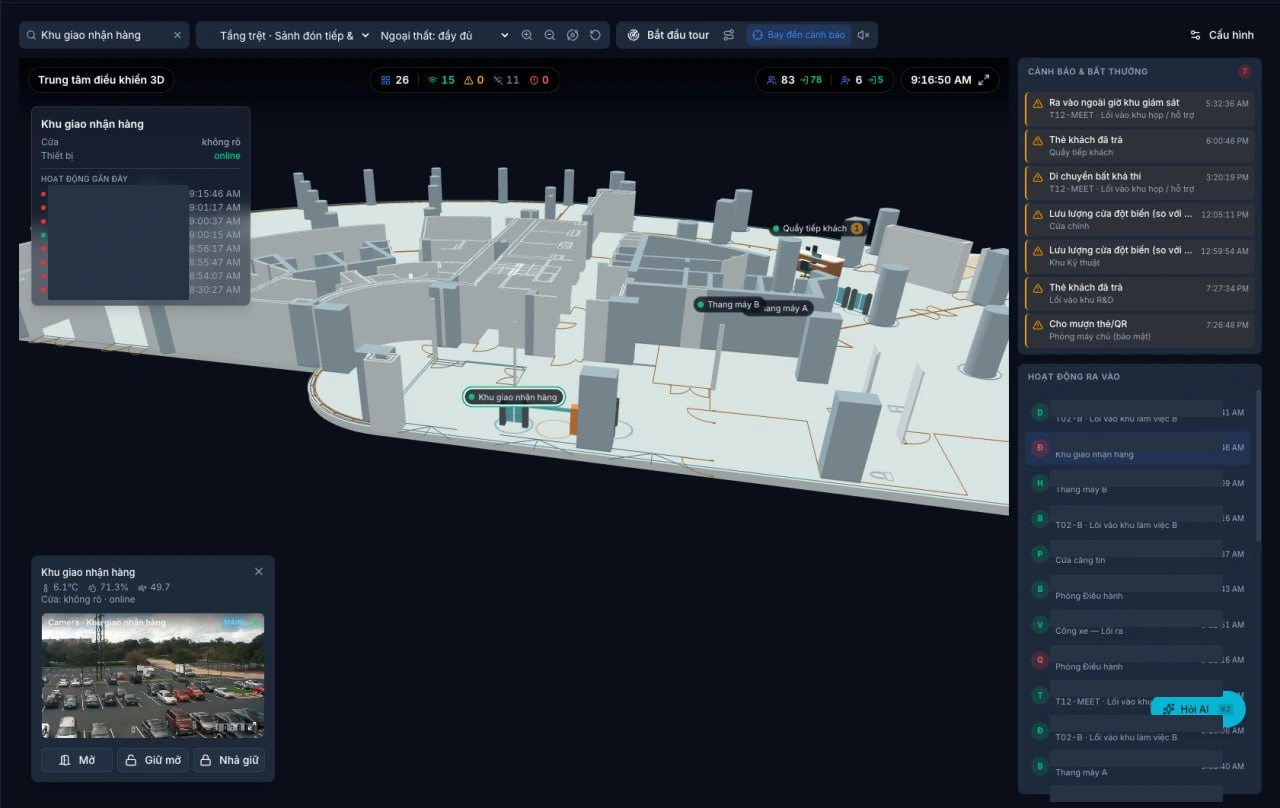
Actual 3D Command Center interface illustrating features; identity information is masked.
A door-held-open alert appears on screen. The security team needs to locate the door, find the relevant camera and identify who will investigate. Looking up a door code, opening a separate plan and searching another camera list adds friction to that process.
Duall Master's 3D Command Center places configured access points within a spatial model of the site. Operators can move from the building overview to an individual floor and open the information associated with a selected access point. The purpose is practical: identify where something happened and bring up the information needed to respond.
Move from the building overview to a specific door
With a prepared and mapped model, operators can rotate the view, select individual floors and adjust the building shell display to inspect interior spaces. Access-point markers connect the model to system data rather than serving as static annotations.
Access-point search brings the operator to the relevant location. Selecting a door can show its state, device status and recent access events. Consistent naming and accurate mapping are part of deployment, so operators and field teams refer to the same locations.
Bring camera and local information into one view
Where a camera is linked to an access point and the operator has the appropriate permissions, live video helps verify the scene. Configured environmental sensors can add local readings.
Available information depends on enabled modules, connected devices, mapping and permissions. Not every marker automatically includes a camera or sensor, and live information depends on connectivity.
Connect alerts with incident follow-up
The event and alert rail helps operators select an item and focus on its mapped location. Building, floor and access-point context make it easier to understand where attention is needed.
The 3D screen also connects to Duall Master's incident-management workflow. An alert that needs follow-up can become a case with an assignee and a tracked resolution process. Evidence and status updates belong to that shared incident workflow rather than an informal handover between shifts. An alert is a reason to investigate, not proof of wrongdoing.
Support emergency response and safety confirmation
During an emergency, operators need to identify the affected area, assembly points and people whose safety has not yet been confirmed. Emergency mode displays the affected area and assembly points on the site model to support coordination under the facility’s response procedures.
Authorized staff can review counts of people confirmed safe, those not yet accounted for and their last recorded locations to coordinate checks. A last recorded location is not a person’s current location: an access event does not prove that someone remains in that area.
Safety confirmation requires real-world verification and an update by an authorized operator. The feature supports evacuation coordination and information management; it does not replace dedicated fire-safety systems, the facility’s emergency procedures or emergency responders.
Follow an automatic map-view tour
The automatic map-view tour moves between configured observation points with selected dwell times. It does not control PTZ cameras and does not replace physical patrols.
Automatic movement through camera viewpoints and a recorded field patrol serve different purposes. A rotating or touring display is not evidence that a guard physically checked a location.
Keep control actions governed
Access-point commands require the appropriate permissions and supported device configuration. Agree who can view, who can act and which site procedures apply before using controls on live doors.
The 3D interface does not replace Duall Master's offline-first access architecture: devices make access decisions locally using synchronized data. Fresh monitoring information, live video and remote commands still depend on connectivity. Offline door operation does not mean that a disconnected control room continues receiving live updates.
Prepare a site-specific demonstration
- Prepare the spatial model and identify buildings, floors, zones and access points.
- Standardize door and area names before mapping real system data.
- Link the required cameras and sensors and verify permissions and connectivity.
- Select the workflows to demonstrate: door monitoring, alert verification or automatic map-view tours.
- Test the intended workstation, browser and display with a representative device and video workload.
- Include disconnection, missing device responses and shift handover in acceptance scenarios.
Duall Master connects Access Control, Visitor Management, Attendance, Parking, Video Management and Video Intercom on a shared platform. The 3D Command Center adds spatial context to configured data and workflows. Share your site plans, access-point list and priority scenarios to discuss a demonstration that reflects how your team actually works.
Keep reading
More from the newsroom
Security patrol management and incident handling: beyond “reported”
Read article →
Access control quotations: what should the scope include?
Read article →